
HTML 11 extension provides tool windows in Visual Studio 2017/2019 showing preview of an HTML document you are currently editing, on desktop and mobile devices:

The preview is updated as you type. When you change a .css or a .js file referenced in the HTML document, the preview is updated after you save the referenced file.
To initially open HTML 11 tool windows, select Desktop preview or Mobile preview in the main HTML11 menu:

You can position opened tool windows alongside the HTML editor or outside the main Visual Studio window, e.g. on a second monitor.
In HTML 11 options you can select a mobile device for preview:
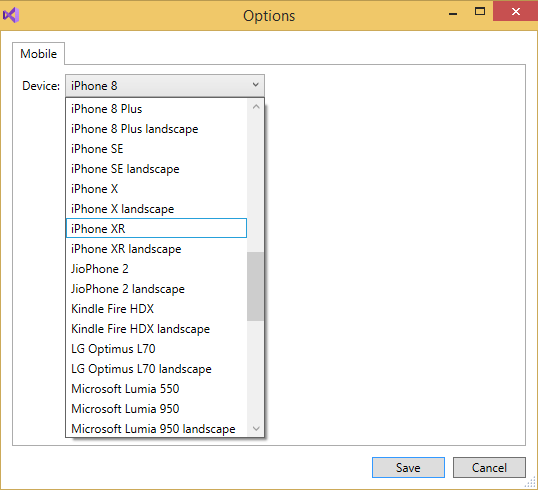
HTML is rendered using Chromium Embedded Framework v75. A mobile device is simulated with Chromium DevTools Device Mode.
HTML 11 personal license costs $39/year. Download HTML 11 trial from the official site or Visual Studio Marketplace.

 Making Visual Studio perfect
When using HTML11 in one of my mvc .net web applications, the preview doesn’t work. I think the main diference is the support for multiple languages in that web app, with custom base control. Can be that the problem? How to make it work?
Please install the new version https://vlasovstudio.com/html11/HTML11_170.vsix , enable diagnostics in Options and check the Output window General page for any errors.
Output:
HTML11 22:07:22.555 http://localhost:59999/Home/Tourists – Unable to connect to the remote server
HTML11 22:08:16.106 http://localhost:59999/Home/Tourists – The remote server returned an error: (404) Not Found.
An error occurred while sending the request.
The problem is that the webapp is multi language, with implementation based on:
https://afana.me/archive/2011/01/14/aspnet-mvc-internationalization.aspx/
Using a BaseController that sets the culture, the correct url should be (for exemple):
http://localhost:59999/en/Home/Tourists or
http://localhost:59999/pt/Home/Tourists
And uses RouteConfig to change urls too.
Can you fix the extension to support this?
Thanks
Please install v1.8.1 and add a redirection rule with Pattern=.+ and Target=en/$_ in Project options as described here: https://vlasovstudio.com/html11/index.html#Redirection
It works! Thank you.