Runtime Flow v1.5 adds support for Visual Studio 2015

Runtime Flow in real time monitors and logs function calls and function parameters in a running .NET application and shows a stack trace tree, with no instrumentation or source code required for monitoring.

v1.5 adds support for Visual Studio 2015 and fixes the “Output file name required for the Start Project option” error when starting monitoring in a localized Visual Studio edition.

Download the installer.

Posted in Vlasov Studio tools | Tagged , | Leave a comment

Visual Time Spent v1.1.0 adds support for Visual Studio 2015

Visual Time Spent automatically tracks your time spent working on solutions, projects and documents in Visual Studio IDE. It allows you to generate reports to see overall time spent and what activities took most time.

v1.1.0 adds support for Visual Studio 2015.

Download the installer.

Posted in Vlasov Studio tools | Tagged , | Leave a comment

Visual Commander v2.0 adds macros support to Visual Studio 2015

Visual Commander is a freemium extension for Visual Studio 2010+ allowing you to automate repetitive tasks in the IDE.

Visual Commander v2.0 adds support for Visual Studio 2015 and checks for simultaneous snippets file modification from different Visual Studio instances.

Download the installer.

Posted in Vlasov Studio tools | Tagged , | Leave a comment

Visual Studio tips from Ben Williams

Ben Williams runs a series of Visual Studio tips that currently includes 8 posts. Read them all starting from the tips index page.

Posted in Visual Studio tips | Leave a comment

Tabs Studio v3.6.0 improves support for Visual Studio 2015

Tabs Studio is a Visual Studio and SSMS add-in empowering you to work comfortably with any number of open documents.

v3.6.0 improves support for Visual Studio 2015. See the full what’s new list.

Download the installer.

Posted in Vlasov Studio tools | Tagged | Leave a comment

ReSharper C++

JetBrains last month released ReSharper C++ – a Visual Studio extension offering refactoring, navigation, code inspection, quick-fixes and code generation for C++ developers. It doesn’t support C++/CLI and thus of no help for my projects, but for pure native C++ developers it provides more features than Visual Assist.

Other reviews, comments and opinions:

A personal license costs $99 (same as Visual Assist), a 30-day trial is available. Visual Studio 2015, 2013, 2012 and 2010 are supported.


Organize Visual Studio tabs with Tabs Studio add-in

Posted in Reviews | Tagged , , , , , | Leave a comment

Fix File Encoding v1.2 adds support for Visual Studio 2015

Fix File Encoding is a free extension that prevents Visual Studio 2010+ from adding BOM to UTF-8 files.

v1.2 adds support for Visual Studio 2015 and by default protects both .htm and .html files.

Download the installer.

Posted in Vlasov Studio tools | Tagged , | Leave a comment

Tabs Studio v3.5.0 adds support for Visual Studio 2015

Tabs Studio is a Visual Studio and SSMS add-in empowering you to work comfortably with any number of open documents.

v3.5.0 adds support for Visual Studio 2015. See the full what’s new list.

Download the installer.

Posted in Vlasov Studio tools | Tagged , | Leave a comment

Visual Studio Time Savers

Susan Ibach runs a Visual Studio Time Savers video series highlighting useful, but not very well known Visual Studio IDE features. Have a look!

Posted in Visual Studio tips | Leave a comment

Macros for Visual Studio 2013

Visual Studio Platform Team has released the Macros for Visual Studio 2013 extension for VS 2013 to record, edit and execute text editing commands and window operations. You can open the new Macro Explorer tool window from the Tools – Macros menu:
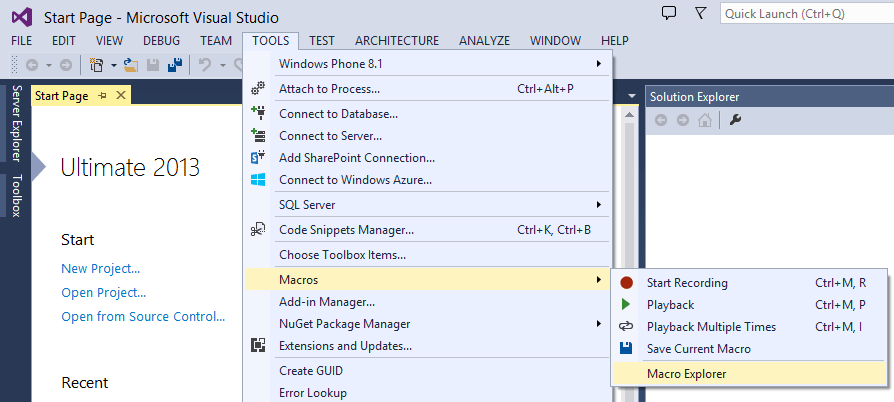
Macros menu

Macro Explorer lists your own macros and preinstalled samples:
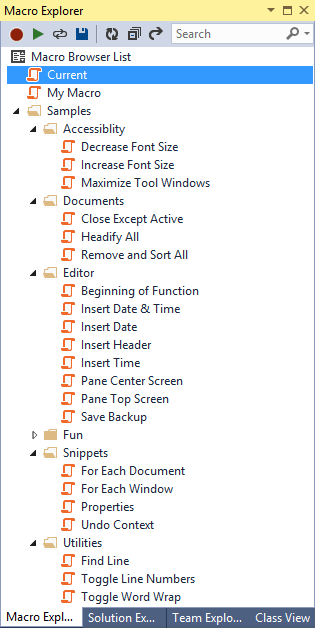
Macro Explorer

Each macro consists of JavaScript code and stored in a .js file that you can edit in Visual Studio as usual. Access to Visual Studio automation model is provided using the familiar dte object:

Macro code

You can run a macro double-clicking the name in Macro Explorer or assign a keyboard shortcut (for up to 9 macros).

(To react on Visual Studio events like document saving or reuse older VB macros you still need to use the Visual Commander extension. Visual Commander additionally allows you to write command code in C# and provides access to .NET framework.)

You can download Macros for Visual Studio 2013 here.


Organize Visual Studio tabs with Tabs Studio add-in

Posted in Reviews | Tagged , | 2 Comments
