Visual Studio 2013 RTM released

Visual Studio 2013 RTM is now available for download. See what’s new, download an installer, read about the new product activation procedure.
Posted in Uncategorized | Tagged | Leave a comment

Runtime Flow v1.3.5 adds support for Visual Studio 2013

Runtime Flow in real time monitors and logs function calls and function parameters in a running .NET application and shows a stack trace tree, with no instrumentation or source code required for monitoring.

v1.3.5 adds support for Visual Studio 2013 and the ability to run without .NET 3 installed in Visual Studio 2010+.

Download the installer.

Posted in Vlasov Studio tools | Tagged , , | Leave a comment

Sync Block Edit v1.1 adds support for Visual Studio 2013

Sync Block Edit is a free extension that lets you easily update duplicate blocks of text in multiple files from Visual Studio 2010+.

v1.1 adds support for Visual Studio 2013.

Download the installer.

Posted in Vlasov Studio tools | Tagged , | Leave a comment

Fix File Encoding v1.1 adds support for Visual Studio 2013

Fix File Encoding is a free extension that prevents Visual Studio 2010+ from adding BOM to UTF-8 files.

v1.1 adds support for Visual Studio 2013.

Download the installer.

Posted in Vlasov Studio tools | Tagged , | Leave a comment

Visual Commander v1.1 simplifies command sharing

Visual Commander is a free extension for Visual Studio 2010+ allowing you to automate repetitive tasks in the IDE.

v1.1 adds the ability to export/import commands and extensions to share with others. See the full what’s new list.

Download the installer.

Posted in Vlasov Studio tools | Tagged , , , | Leave a comment

Text Sharp v1.7 adds support for the Ideal text formatting mode

Text Sharp is a free extension for Visual Studio 2010+ that lets you adjust text clarity in the IDE.

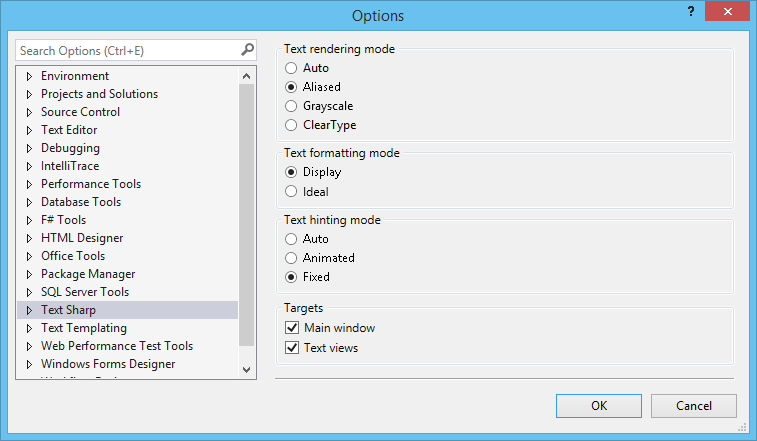
v1.7 adds the ability to select text formatting and text hinting modes. While the Display text formatting mode generally produces crisper text, the Ideal text formatting mode and the Animated text hinting mode allow sub-pixel text positioning that you may like as well:

Text Sharp options page in Visual Studio 2013

Text Sharp options page in Visual Studio 2013

Download the installer.

Posted in Vlasov Studio tools | Tagged , , , | Leave a comment

Tabs Studio v3.1.3 released

Tabs Studio is a Visual Studio and SSMS add-in empowering you to work comfortably with any number of open documents.

v3.1.3 adds the ability to run Tabs Studio without .NET 3.5 installed in VS 2010+. See the full what’s new list.

Download the installer.

Posted in Vlasov Studio tools | Tagged , , , , | Leave a comment

Visual Commander extension adds macro commands support to Visual Studio 2012/2013

Visual Studio provides extensive automation model for the IDE allowing developers to customize behavior of the environment. This automation model can be accessed from Visual Studio add-ins, Visual Studio extensions, VB scripts, Power Shell and Visual Studio macro commands. The macro commands are often the best choice with their ease of development (comparing to add-ins and extension) and seamless integration with the IDE (comparing to vbs and PS).

Unfortunately, Visual Studio 2012 discontinued built-in support for macros. Several developers offered solutions to fill the gap. Text Macros by Xavier Poinas lets you record text editing operations as a macro command and then replay it as many times as needed. VSScript by Ryszard Ochodzki can record your actions and write Lua scripts with access to the most important parts of the IDE. And now Visual Commander from Vlasov Studio adds support for commands and extensions written in C# or VB with full access to the IDE and .NET framework.

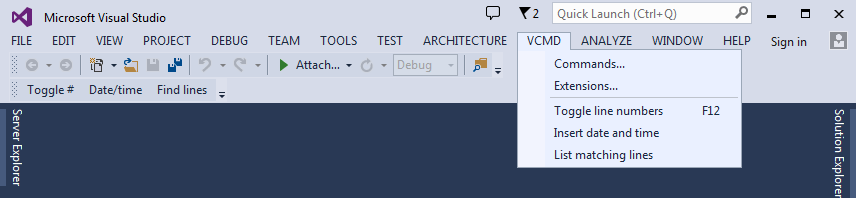
Visual Commander menu in Visual Studio 2013

Visual Commander menu in Visual Studio 2013

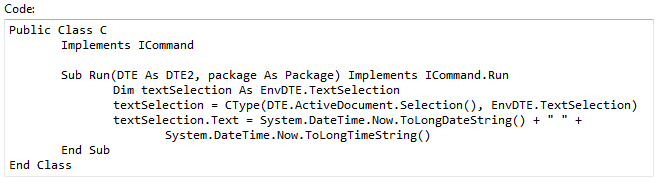
Visual Commander’s command is a class written in C# or VB implementing the Run method. Code of an existing Visual Studio macro from previous versions of Visual Studio can be just pasted in the Run subroutine of a new VB command.

Sample command code

Sample command code

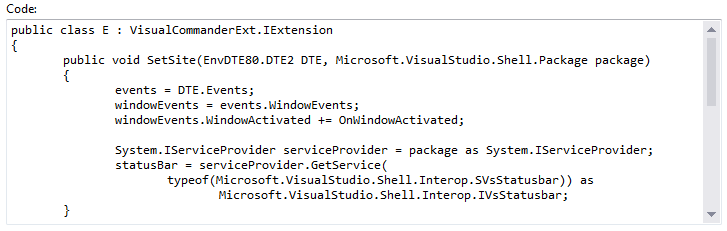
In a Visual Commander’s extension you can hook to Visual Studio events (e.g. build events, window and document operations, solution and project loading, debugger events) and automatically perform custom tasks when needed.

Sample extension code

Sample extension code

Download the free Visual Commander extension for Visual Studio 2010, Visual Studio 2012 and Visual Studio 2013 from the Visual Commander homepage or Visual Studio Gallery.

Posted in Vlasov Studio tools | Tagged , , , | Leave a comment

New features in Visual Studio 2013 IDE

A new video is released on Visual Studio Toolbox featuring enhancements available in Visual Studio 2013 Preview: settings synchronization, notifications center, enhanced scroll bar, peek definition and CodeLenses. Watch the video.

Posted in Uncategorized | Tagged | Leave a comment

Tabs Studio v3.1.0 released

Tabs Studio is a Visual Studio and SSMS add-in empowering you to work comfortably with any number of open documents.

v3.1.0 adds support for Visual Studio 2013 Preview. See the full what’s new list.

Download the installer.

Posted in Vlasov Studio tools | Tagged , , , , | Leave a comment