Text Sharp v1.5 released

Text Sharp is a free extension for Visual Studio 2010 and Visual Studio 2012 that lets you adjust text clarity in the IDE.

v1.5 adds the ability to selectively apply the text rendering mode only to the main Visual Studio window or to the code editor.

Download the installer.

Posted in Vlasov Studio tools | Tagged , , | Leave a comment

Update duplicate blocks of text in multiple files from Visual Studio 2012/2010 with Sync Block Edit extension

It is undesirable, but often necessary to have duplicate blocks of text in multiple files. For example, Google Analytics tracking code in html files or copyright notices in code files. When you need to update this text, sometime you can do it with a simple search and replace. But when you want to make sure no other text is changed or when you want to add or remove lines, multiline search and replace is necessary. Sync Block Edit hides all the complexity of writing multiline find and replace patterns from you.

If your text is already enclosed with distinct begin and end signature lines, just make your changes in one of the files, select the block and click the Sync Update Block button from the Sync Block Edit toolbar:

Update text with Sync Block Edit

Update text with Sync Block Edit

In the Update Text dialog, begin and end lines are automatically filled. You select which files you want to update and click Update. In all files the text between the begin and end lines will be replaced with the selected text from the active document.

If your block in not yet enclosed, it is recommended to add distinct begin and end signature lines before modification. Select the block in one of the files and click the Sync Create Block button from the Sync Block Edit toolbar:
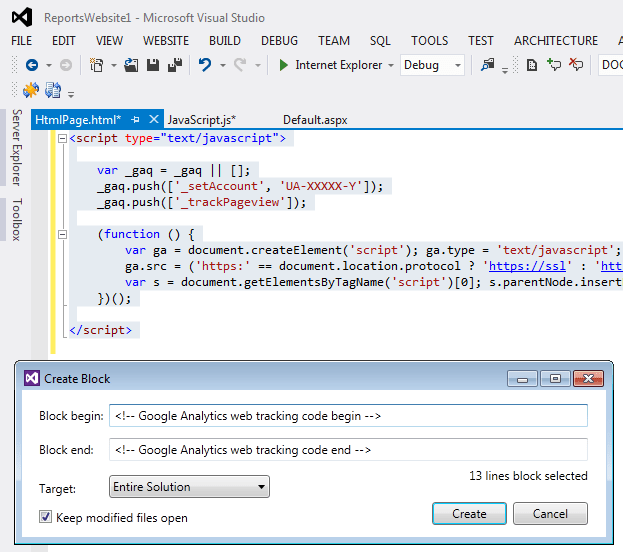
Create block with Sync Block Edit

Create block with Sync Block Edit

In the Create Block dialog enter begin and end lines. Select which files you want to update and click Create. In all files this text block will be enclosed with the begin and end lines. After that you can update the block as described above.

You can download the free Sync Block Edit extension for Visual Studio 2010 and Visual Studio 2012 from the Sync Block Edit homepage.

Posted in Vlasov Studio tools | Tagged , , | 5 Comments

Fix File Encoding extension prevents Visual Studio 2012/2010 from adding BOM to UTF-8 files

When you edit a UTF-8 file in Visual Studio, it adds the byte order mark (BOM) sequence to the beginning of the file. You can select an encoding manually, but you need to do it each time you reopen the file.

Fix File Encoding automatically detects when a UTF-8 file is opened in Visual Studio and sets its encoding to UTF-8 without signature. If you don’t edit the file, it remains unmodified. If you edit the file, it will be saved without the BOM. You can configure which files to encode based on the file path and the file extension (by default, only .html files are protected from Visual Studio).

You can download the free Fix File Encoding extension for Visual Studio 2010 and Visual Studio 2012 from the Fix File Encoding homepage.

Posted in Vlasov Studio tools | Tagged , , | 5 Comments

Tabs Studio v3.0.3 released

Tabs Studio is a Visual Studio and SSMS add-in empowering you to work comfortably with any number of open documents.

v3.0.3 adds detection for Custom Document Well. See the full what’s new list.

Download the installer.

Posted in Vlasov Studio tools | Tagged , , , | Leave a comment

Tabs Studio v3.0.1 released

Tabs Studio is a Visual Studio and SSMS add-in empowering you to work comfortably with any number of open documents.

v3.0.1 improves and simplifies tab coloring. See the full what’s new list.

Download the installer.

Posted in Vlasov Studio tools | Tagged , , , | Leave a comment

Tabs Studio v3.0.0 released

Tabs Studio is a Visual Studio and SSMS add-in empowering you to work comfortably with any number of open documents.

v3.0.0 adds support for Visual Studio 2012 color themes and the right preview tab position. See the full what’s new list.

Download the installer.

Posted in Vlasov Studio tools | Tagged , , , | Leave a comment

Tabs Studio v2.8.2 released

Tabs Studio is a Visual Studio and SSMS add-in empowering you to work comfortably with any number of open documents.

v2.8.2 adds support for Visual Studio 2012 RTM. See the full what’s new list.

Download the installer.

Posted in Vlasov Studio tools | Tagged , , , | Leave a comment

Tabs Studio v2.8.0 released

Tabs Studio is a Visual Studio and SSMS add-in empowering you to work comfortably with any number of open documents.

v2.8.0 adds support for Visual Studio 2012 RC. See the full what’s new list.

Download the installer.

Posted in Vlasov Studio tools | Tagged , , , | Leave a comment

Workspace Reloader extension for Visual Studio 2010 and Visual Studio 11

Workspace Reloader extension by Scott Hanselman preserves open documents in Visual Studio when a project is reloaded.

When a project in your current solution is changed, typically after an update from a source code repository, Visual Studio asks to reload the project:

Project modification outside the environment detected by Visual Studio

Project modification outside the environment detected by Visual Studio

If you agree to reload the project, Visual Studio closes all open documents from this project. The Workspace Reloader extension reopens these documents as if nothing has happened.

The free Workspace Reloader extension supports Visual Studio 2010 and Visual Studio 11. You can download it from Visual Studio Gallery. Source code is available on github. Read about making of this extension on Scott’s blog.

Posted in Reviews | Tagged , , | 1 Comment

Tabs Studio v2.7.2 released

Tabs Studio is a Visual Studio and SSMS add-in empowering you to work comfortably with any number of open documents.

v2.7.2 adds support for Visual Studio 11 Beta and SQL Server 2012 Management Studio. See the full what’s new list.

Download the installer.

Posted in Vlasov Studio tools | Tagged , , , | Leave a comment